
Photo for HWC Baltimore 2017-02-08!

Photo for HWC Baltimore 2017-02-08!
Micropub is an open API standard to create posts on one's own domain using third-party clients and currently a W3C Candidate Recommendation. One of the (semi-) recent additions is the idea of a Micropub Media Endpoint. The Media Endpoint provides a way for Micropub clients to upload media files to a Micropub service, receiving a URL that is sent along in place of the file contents when the post is published.
Some of the things I like about Micropub media endpoints include:
Personally, I wanted a Micropub media endpoint server with a few extra properties:
My extra features above essentially describe a content-addressable storage storage system. CAS is a way of storing and accessing data based on some property of the actual content, rather than (potentially arbitrary) files and folders.
HashFS is a Python implementation of a content-addressable file management system. You give it files, it will put them in a directory structure based on a cryptographic hash function of the contents of that file. In other words - HashFS can take any file and give back a unique path to that file which will never change (if you later upload a new version of the file, it gets a different path).
To add the the fun of HashFS, there is a Flask extension called Flask-HashFS which makes it easy to expose a HashFS file store on the web via the Python Flask framework.
Spano is a Micropub Media Endpoint server written in Python via the Flask framework which combines Flask-HashFS for file storage with Flask-IndieAuth (introduced earlier) to handle authentication and authorization.
Spano is a server-side web app that basically does one thing: it accepts HTTP POST requests with a valid IndieAuth token and a file named "file", stores that file, and returns a URL to that file. The task of serving uploaded files is left to a dedicated web server like nginx or Apache.
Once Spano has been set up and configured for your domain, uploading is a matter of getting a valid IndieAuth token. IndieAuth-enabled Micropub clients will do this automatically. For testing by hand I like to log in to Quill and copy the access token from the Quill settings page. With token in hand, uploads are as easy as:
curl -D - -F "file=@myfile.jpg" \
  -H"Authorization: Bearer xxxx..." \
  https://media.example.com/micropub/
Which should output a response like:
HTTP/1.1 100 Continue

HTTP/1.0 201 CREATED
Content-Type: text/html; charset=utf-8
Content-Length: 108
Location: https://media.example.com/cc/a5/97/7c/2004..2cb.jpg
Server: Werkzeug/0.11.4 Python/2.7.11
Date: Thu, 26 Jan 2017 02:40:05 GMT

File created: https://media.example.com/cc/a5/97/7c/2004..2cb.jpgIf you want Micropub clients to use Spano as your Media Endpoint, you need to advertise it. This is handled by your "main" Micropub server using discovery. Essentially, a client will make a configuration request to your server like so:
https://example.com/micropub?q=config
And your server's response should be a JSON-formatted object specifying the "media-endpoint". A bare minimum example:
{
  "media-endpoint": "https://media.example.com/micropub/"
}
In addition to advertising the media-endpoint, your Micropub server must be able to handle lists of URLs in places where it would normally expect a file.
For example, when posting a photo from Quill without a media endpoint, your Micropub server will receive a multipart/form-data encoded file named "photo". When posting from Quill with a media endpoint, your Micropub server will instead receive a list of URLs represented as "photo[]=https://media.example.com/cc/...2cb.jpg". Presumably this pattern would hold for other media types such as video and audio, if you are using Micropub clients that support them.
This particular step has been an interesting challenge for my site, which is a static site generated by Jekyll. My previous Micropub file-handling implementation expected all uploaded assets to live on disk next to the post files, and updating my Jekyll theme and plugins to handle the change is a work in progress. I eventually plan to move all my uploads out of the source for my project in favor of storing them with Spano.
Spano is probably my second public Python project, so I'd love feedback! If you try it out and run into issues, please drop me a line on GitHub. Or you can find me in the #indieweb chat on freenode IRC.
I'd also like to thank Kyle Mahan for his Woodwind Flask server application, which inspired the structure of Spano.
One of the things I like about the IndieWeb community is that while they are building tools for themselves, they also tend to release useful parts under Free Software licenses. This helps other developers join the community more quickly, but it also tends to help improve the quality and feature sets of these projects as others use and add to the source.
One of my favorite things to come from the IndieWeb folks is the Micropub API standard, which defines some simple protocols for clients to send post data (the kinds of things you'd share on a blog or social media: images, short plain text, long articles, tags, and more) to servers for posting. One upshot is that if your server accepts Micropub, you can use one of many clients to put content on your site. I'm using a dedicated editor from Aaron Parecki's Quill to write this post, but there are lots of alternatives that are aimed at special use cases. For example, Kyle Mahan's Woodwind is an IndieWeb reader app that happens to include functionality for posting replies, favorites, reposts, and even RSVPs directly to my site via Micropub.
Another favorite is the idea of IndieAuth for web sign-in. At a high level, the idea is that you create two-way links between your website and your user profile on some other silo. For example, on your homepage you add a link to your Twitter profile and on your Twitter profile you link back to your homepage. For a client that supports IndieAuth, I can log in using my homepage URL by verifying that I can log in to my Twitter account.
My own personal Micropub implementation is a little pile of spaghetti Python code making use of the Flask framework. I use IndieAuth to handle authentication (i.e. - proving that a post comes from an app that I've logged into) and authorization (i.e. - proving that I gave that app permission to post to my site). As I've started improving my Micropub implementation, I found it useful to extract that portion of my code into a library that can be used with other Flask applications.
Flask-IndieAuth is a Flask extension that adds the ability to require a client to send a valid IndieAuth token when making requests to any route. For example:
from flask_indieauth import requires_indieauth

@app.route('/micropub', methods=['GET','POST'])
@requires_indieauth
def handle_micropub():
    # ... handle the request
The @requires_indieauth decorator runs before the code for the route. It currently looks for an IndieAuth token in one of three places, in order:
If a token is found, it will be verified against the configured Token Endpoint to confirm that it is a valid token issued for your server's configured homepage with a sufficient scope.
For more information on how to install, configure, and use Flask-IndieAuth, please check out the README on GitHub.
I'll be using this extension to build my Micropub media endpoint (coming up in a future post) and so far it is working just fine. That said, I know there is a lot of room for improvement. Some things on my list:
This is my first published Flask extension (heck, it's my first public Python package on PyPI), and I'd really appreciate comments, questions, pull requests, etc. Feel free to reach out on GitHub, or you can find me in the #indieweb chat on freenode IRC.
Baltimore's first Homebrew Website Club of 2017 met at the Digital Harbor Foundation Tech Center on 2017-01-25.
Notes from the "broadcast" portion of the meetup:
martymcgui.re - mf2 for deleted posts. Packaged and released his first Python package, a Flask IndieAuth lib for micropub servers, has a proof of concept micropub media server built on Flask-HashFS.
brianey.com - lots of WordPress IndieWeb plugins setup on his site. Has IndieAuth working. Thinks micropub is working. Also integrating these into humor/fake-advice site imnotwrong.com, POSSE to Medium. Discovered that people still use StumbleUpon and got some good traffic from there.
jeancedre.com - wrote down list of things to do to refresh portfolio site. Chose new color scheme and brought it into Sketch to start designing. New website will mean new logo, layout, etc., and eventually business cards based on that. Not sure if wants to use WordPress "because it's overkill". Discussed how he wants to "use" the site, as the author, since WP provides a nice CMS that supports lots of workflows.
jonathanprozzi.net - did lots of refactoring of his Hugo theme into logical partials. Goal is to make a Hugo theme that supports IndieWeb via mf2 out of the box. Has also started making an ongoing list of all the changes he has been making, or wants to make, on his site.
We discussed the renewed IndieWeb interest in automatically archiving our posts and links to the Internet Archive, prompted by the content deletions and Twitter censoring of the new U.S. gov't administration. We also discussed the upcoming CryptoParty Baltimore happening in a little over a week on Feb 4th.
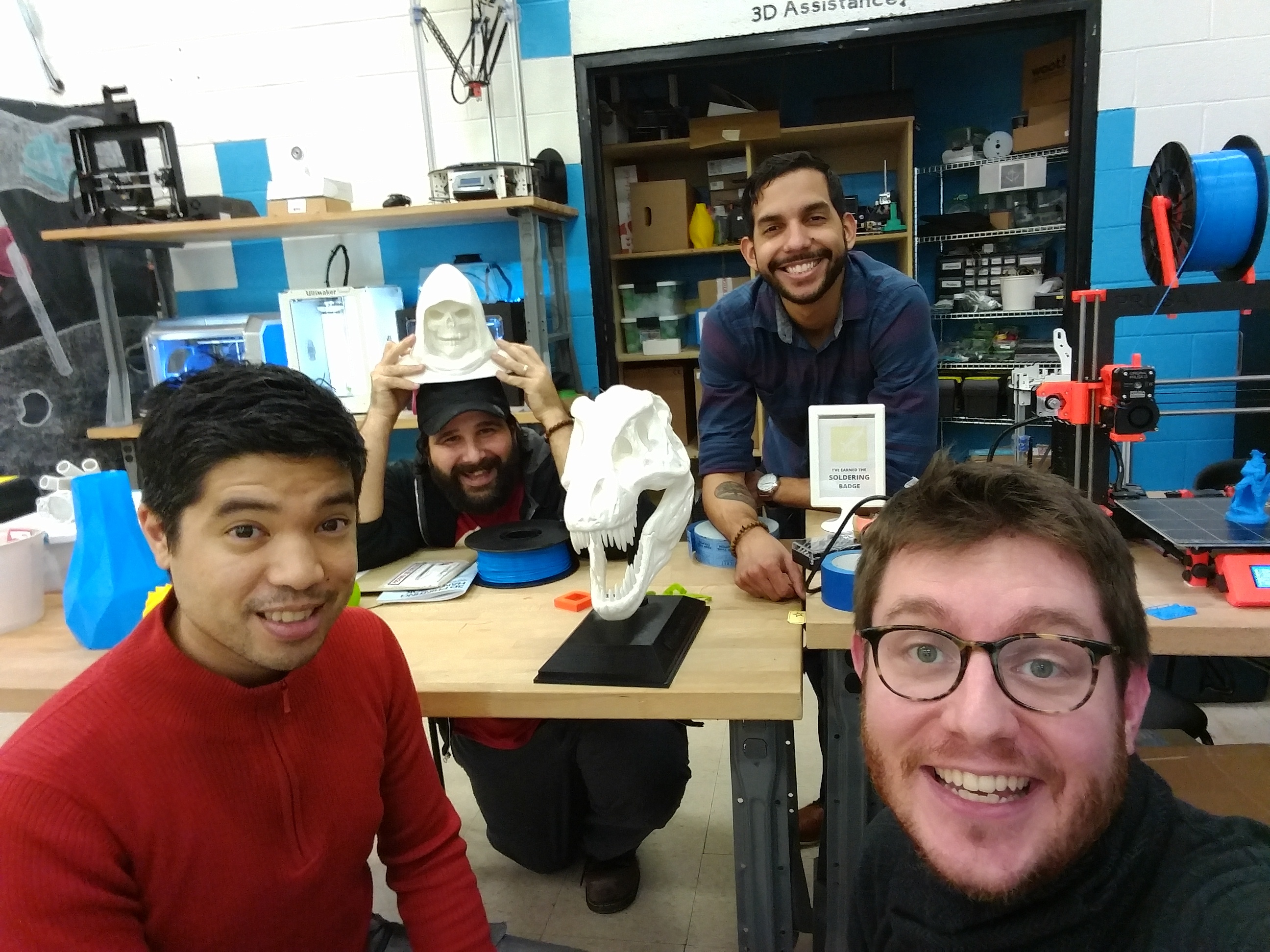
We hope you'll join us for the next HWC Baltimore meetups: Feb 8th and March 22nd!
Photo for tonight’s Homebrew Website Club Baltimore.
This sounds like a really great challenge either way! I am rooting for #100DaysOfIndieWeb because I learn so much about #IndieWeb from your stuff.
Great post from @aaronpk about his #IndieWeb setup. I should make one of these!
Great writeup by http://jonathanprozzi.net/ about the positive effects of setting aside even an hour a month to learn and work on new things.
http://jonathanprozzi.net/2016/12/homebrew-website-club-reflections/
My 2017-01-01 #IndieWeb commitment is to improve the way I handle files and images to speed up both posting and pageloads for my site.
A couple of days ago I wrote up a set of instructions for setting up a self-hosted copy of Woodwind with nginx and upstart. Since then I noticed that many images were broken on the feeds I was looking at - a common problem when a site that is served with HTTPS is displaying images and other content from another site that is served with HTTP.
I noticed that the main site woodwind.xyz was serving images through special URLs like:
https://woodwind.xyz/imageproxy/?url=https%3A%2F%2Fmartymcgui.re%2Fimages%2Flogo.jpg&op=noop&sig=...
Looking in the source code, I found that Woodwind has support for image proxies, which are neat little services that can help serve remote HTTP content over HTTPS, resize images on the fly, and more.
I'd been meaning to set up one of these services for my own site, so this seemed like a good time to jump in!
Since my server already has Go I chose Will Norris' imageproxy, which has a similar deployment setup to how I am already running Woodwind: Upstart manages a standalone process and nginx acts as a proxy to pass along requests.
Installation was fairly simple, once I had my GOPATH set up correctly:
go get https://github.com/willnorris/imageproxy
For running a persistent service, Will has an example Upstart configuration, which I modified a bit and placed in /etc/init/imageproxy.conf:
description "Image Proxy server"
start on (net-device-up)
stop on runlevel [!2345]

respawn
exec start-stop-daemon --start -c www-data --exec /home/imageproxy_user/go/bin/imageproxy -- \
    -addr localhost:4593 \
    -log_dir /var/log/imageproxy \
    -cache /var/cache/imageproxy \
    -signatureKey @/etc/imageproxy.key
Before starting up the service, there were a few extra steps:
Create /var/log/imageproxy and /var/cache/imageproxy and make sure they are owned by the www-data user.
Create the "signature key" in /etc/imageproxy.key. This is used to authorize each image request so that random folks can't proxy random stuff through your imageproxy. I used the command line openssl tool for this, with an extra pass through awk to remove the newline character that openssl spits out.
$ sudo openssl rand -base64 42 | awk 'BEGIN{ORS="";} {print} > /etc/imageproxy.keyI also made sure that /etc/imageproxy.key was owned and readable by www-data and no other user.
I could then start up the server with:
sudo start imageproxy
Next it was time to configure nginx to send proxied image requests along to imageproxy. I opened up the nginx woodwind.conf file that I had created and added a new location block:
location ~ ^/imageproxy/ {
        # pattern match to capture the original URL to prevent URL
        # canonicalization, which would strip double slashes
        if ($request_uri ~ "/imageproxy/(.+)") {
            set $path $1;
            rewrite .* /$path break;
        }
        proxy_pass http://localhost:4593;
    }
After restarting nginx, requests to https://woodwind.yourdomain.com/imageproxy/... would be forwarded to the imageproxy server.
Finally, it was time to configure Woodwind to use the proxy. I opened up woodwind.cfg and added two lines:
IMAGEPROXY_URL = '/imageproxy'
IMAGEPROXY_KEY = '...' # the contents of /etc/imageproxy.key
A quick restart of the Woodwind service, a browser refresh and I have images aplenty!

Thanks for reading! I hope this little HOWTO was useful. I look forward to more fun with imageproxy in my IndieWeb adventures. How might you be able to put imageproxy to use?

